
 SSM整合—注解开发
# SSM框架整合
# 导入坐标
<dependencies>
  <!-- spring mvc  里面包含了spring-context-->
  <dependency>
    <groupId>org.springframework</groupId>
    <artifactId>spring-webmvc</artifactId>
    <version>5.3.6</version>
  </dependency>


  <!-- spring ——junit-->
  <dependency>
    <groupId>org.springframework</groupId>
    <artifactId>spring-test</artifactId>
    <version>5.3.6</version>
  </dependency>
  <dependency>
    <groupId>junit</groupId>
    <artifactId>junit</artifactId>
    <version>4.13</version>
    <scope>test</scope>
  </dependency>


  <!-- spring ——mybatis-->
  <dependency>
    <groupId>org.mybatis</groupId>
    <artifactId>mybatis</artifactId>
    <version>3.5.5</version>
  </dependency>
  <dependency>
    <groupId>org.mybatis</groupId>
    <artifactId>mybatis-spring</artifactId>
    <version>2.0.5</version>
  </dependency>
  <dependency>
    <groupId>org.springframework</groupId>
    <artifactId>spring-jdbc</artifactId>
    <version>5.3.6</version>
  </dependency>
  <dependency>
    <groupId>org.springframework</groupId>
    <artifactId>spring-tx</artifactId>
    <version>5.3.6</version>
    <scope>compile</scope>
  </dependency>
  <dependency> <!-- 数据源用这个 不要用c3p0 版本有问题-->
    <groupId>com.alibaba</groupId>
    <artifactId>druid</artifactId>
    <version>1.1.10</version>
    <scope>compile</scope>
  </dependency>

  <!-- mysql-->
  <dependency>
    <groupId>mysql</groupId>
    <artifactId>mysql-connector-java</artifactId>
    <version>5.1.46</version>
  </dependency>
  <!-- servlet-->
  <dependency>
    <groupId>javax.servlet</groupId>
    <artifactId>javax.servlet-api</artifactId>
    <version>4.0.1</version>
    <scope>provided</scope>
  </dependency>

  <!-- json-->
  <dependency>
    <groupId>com.fasterxml.jackson.core</groupId>
    <artifactId>jackson-databind</artifactId>
    <version>2.11.4</version>
  </dependency>

  <!-- aop-->
  <dependency>
    <groupId>org.aspectj</groupId>
    <artifactId>aspectjweaver</artifactId>
    <version>1.9.4</version>
  </dependency>
</dependencies>
# Spring相关配置
Spring 配置类
//spinrg 配置类
@Configuration

//包扫描
@ComponentScan({"com.diana.mapper","com.diana.service"})

//导入配置类
@Import({JdbcConfig.class,MybatisConfig.class})

//开启 切面
@EnableAspectJAutoProxy


//开启事务
@EnableTransactionManagement


public class SpringConfig {
}
# Mybatis 相关配置
jdbc配置文件
jdbc.driver=com.mysql.jdbc.Driver
jdbc.url=jdbc:mysql:///test?useSSL=false&useServerPrepStmts=true
jdbc.username=root
jdbc.password=1234
Jdbc配置类
// Jdbc配置
@PropertySource("classpath:jdbc.properties")

public class JdbcConfig {

    @Value("${jdbc.driver}")
    private String driver;
    @Value("${jdbc.url}")
    private String url;
    @Value("${jdbc.username}")
    private String username;
    @Value("${jdbc.password}")
    private String password;


    @Bean //得到数据源
    public DataSource dataSource() throws Exception {
        DruidDataSource dataSource =new DruidDataSource();
        dataSource.setDriverClassName(driver);
        dataSource.setUrl(url);
        dataSource.setUsername(username);
        dataSource.setPassword(password);
        return  dataSource;
    }

    @Bean //得到事务管理器
    public PlatformTransactionManager transactionManager(DataSource dataSource){
        DataSourceTransactionManager dataSourceTransactionManager=new DataSourceTransactionManager();
        dataSourceTransactionManager.setDataSource(dataSource);
        return dataSourceTransactionManager;
    }
}
Mybatis配置类
//mybatis 配置类
public class MybatisConfig {

    @Bean //得到sqlSession 工厂
    public SqlSessionFactoryBean sqlSessionFactory(DataSource dataSource){
        SqlSessionFactoryBean sqlSessionFactoryBean=new SqlSessionFactoryBean();
        sqlSessionFactoryBean.setDataSource(dataSource); //设置数据源
        sqlSessionFactoryBean.setTypeAliasesPackage("com.diana.pojo");//设置别名
        return sqlSessionFactoryBean;
    }

    @Bean //得到mapper映射
    public MapperScannerConfigurer mapperScannerConfigurer(){
        MapperScannerConfigurer mapperScannerConfigurer=new MapperScannerConfigurer();
        mapperScannerConfigurer.setBasePackage("com.diana.mapper");//设置mapper所在的包
        return  mapperScannerConfigurer;
    }

}
# Spring-MVC相关配置
SpringMVC配置类
//spring-mvc 配置类
@Configuration

//扫描包
@ComponentScan({"com.diana.controller","com.diana.config"})

//开启spring-mvc 注解驱动
@EnableWebMvc

public class SpringMvcConfig {
}
SpringMVC支持类
//springmvc支持类
@Configuration

public class SpringMvcSupport extends WebMvcConfigurationSupport{

    @Autowired
    private ProjectInterceptor projectInterceptor;
    @Autowired
    private ProjectInterceptor2 projectInterceptor2;

    @Override //放行静态资源
    protected void addResourceHandlers(ResourceHandlerRegistry registry) {
        //当访问/pages/??? 时候, 走/pages目录下的内容
        registry.addResourceHandler("/pages/**").addResourceLocations("/pages/");
        registry.addResourceHandler("/js/**").addResourceLocations("/js/");
        registry.addResourceHandler("/css/**").addResourceLocations("/css/");
        registry.addResourceHandler("/plugins/**").addResourceLocations("/plugins/");
    }


    @Override//添加拦截器链   在前面的先执行
    protected void addInterceptors(InterceptorRegistry registry) {
        //拦截  /books和/books/*
        //  /books只能拦截 /books  不能拦截/books/1
        registry.addInterceptor(projectInterceptor).addPathPatterns("/books","/books/*");
        registry.addInterceptor(projectInterceptor2).addPathPatterns("/books","/books/*");
    }
}
# Web启动配置
web启动类
// web启动配置类
public class WebConfig extends AbstractAnnotationConfigDispatcherServletInitializer {
    //加载spring配置类
    protected Class<?>[] getRootConfigClasses() {
        return new Class[]{SpringConfig.class};
    }

    //  spring-mvc的容器可以访问spring的容器,spring的容器不能访问spring-mvc的容器

    //加载spring-mvc配置类
    protected Class<?>[] getServletConfigClasses() {
        return new Class[]{SpringMvcConfig.class};
    }
    //设置spring-mvc拦截哪些请求
    protected String[] getServletMappings() {
        return new String[]{"/"};
    }
    //全局过滤器
    @Override
    protected Filter[] getServletFilters() {
        //乱码处理-- 只能处理post
        CharacterEncodingFilter filter = new CharacterEncodingFilter();
        filter.setEncoding("UTF-8");
        return new Filter[]{filter};
    }

}
# 表现层数据封装
为了所有的方法返回相同类型的数据,要将返回结果封装成Result类,便于开发
# Result 类
// 重要
//前端和后台的 约定   ----数据传输协议   里面的属性 自定义
//提供几种 构造方法 方便使用


//表现层结果封装类
public class Result {
    private int code; //存放状态码
    private Object data; //查询存放数据,增删改存放true/flase
    private String msg; //存放消息

    public Result(){
    }

    public Result(int code,Object data){
        this.data=data;
        this.code=code;
    }

    public Result(int code,Object data,String msg){
        this.data=data;
        this.code=code;
        this.msg=msg;
    }


    public Object getData() {
        return data;
    }

    public void setData(Object data) {
        this.data = data;
    }

    public int getCode() {
        return code;
    }

    public void setCode(int code) {
        this.code = code;
    }

    public String getMsg() {
        return msg;
    }

    public void setMsg(String msg) {
        this.msg = msg;
    }
}
# 状态码约定类
// 定义协议码
//根据项目 和前端自行协商
public class Code {

    //成功码值 -- 1结尾
    public static final Integer SAVE_OK=20011;
    public static final Integer DELETE_OK=20021;
    public static final Integer UPDATE_OK=20031;
    public static final Integer GET_OK=20041;


    //失败码值 -- 0结尾
    public static final Integer SAVE_ERR=20010;
    public static final Integer DELETE_ERR=20020;
    public static final Integer UPDATE_ERR=20030;
    public static final Integer GET_ERR=20040;

    //系统异常
    public static final Integer SYSTEM_ERR=50001;
    public static final Integer SYSTEM_TIMEOUT_ERR=50002;
    public static final Integer SYSTEM_UNKNOW_ERR=59999;
    //业务异常
    public static final Integer BUSNIESS_ERR=60001;

}
# 表现层封装
**三元运算符 A?B:C A为true取B,为false取C **
//结果集返回结果
//表现层数据封装

@RestController
@RequestMapping("/books")
public class BookController_Result {
    @Autowired
    private BookService bookService;

    @PostMapping //增加数据
    public Result save(@RequestBody Book book){
       boolean flag = bookService.save(book);
       return new Result(flag ? Code.SAVE_OK : Code.SAVE_ERR,flag);//三元运算符 A?B:C  A为true取B,为false取C
    }

    @DeleteMapping("/{id}")//删除数据
    public Result delete(@PathVariable int id){
        boolean flag = bookService.delete(id);
        return  new Result(flag ? Code.DELETE_OK : Code.DELETE_ERR,flag);
    }

    @PutMapping//修改数据
    public Result updete(@RequestBody Book book){
        boolean flag = bookService.update(book);
        return new Result(flag ? Code.UPDATE_OK : Code.UPDATE_ERR,flag);
    }


    @GetMapping("/{id}")//根据id查询数据
    public Result getById(@PathVariable int id){
        //int i=1/0;  模拟异常
        Book book = bookService.selectById(id);
        Integer code= book != null ? Code.GET_OK : Code.GET_ERR;
        String msg= book !=null ? "":"查询失败,请重试!";
        return new Result(code,book,msg);
    }


    @GetMapping//查询所有数据
    public Result getAll(){
        List<Book> books = bookService.selectAll();
        Integer code= books != null ? Code.GET_OK : Code.GET_ERR;
        String msg= books != null ? "":"查询失败,请重试!";
        return new Result(code,books,msg);
    }
}
# 异常处理
所有的异常全都抛出到表现层进行处理
# 常见异常
- 框架内部抛出的异常:因使用不合规导致
- 数据层抛出的异常:因外部服务器故障导致(例如:服务器访问超时)
- 业务层抛出的异常:因业务逻辑书写错误导致(例如:遍历业务书写操作,导致索引异常等)
- 表现层抛出的异常:因数据收集、校验等规则导致(例如:不匹配的数据类型间导致异常)
- 工具类抛出的异常:因工具类书写不严谨不够健壮导致(例如:必要释放的连接长期未释放等)
# 项目异常分类
- 业务异常
- 规范的用户行为产生的异常——>(用户手滑打错了 age=diana ……)
- 不规范的用户行为操作产生的异常——>(专业用户 故意找茬 ……)
- 系统异常
- 项目运行过程中可预计且无法避免的异常——>(数据库宕机,操作系统宕机,停电……)
- 其他异常
- 编程任意未预期到的异常——>(文件错误……)
# 项目异常处理方案
- 业务异常
- 发送对应消息传递给用户,提醒操作规范
- 系统异常
- 记录日志
- 发送特定消息给运维人员,提醒维护
- 发送邮件给开发人员,包括ex对象
- 发送固定消息传递给用户,进行安抚
- 其他异常
- 发送固定消息传递给用户,安抚用户
- 发送特定消息给编程人员,提醒维护(纳入预期范围内)
- 记录日志
# 异常处理器 类
@RestControllerAdvice //RESTful 异常处理
public class ProjectExceptionAdvice {

    //处理系统异常
    @ExceptionHandler(SystemException.class)
    public Result doSystemException(SystemException ex){
        //记录日志
        //发送特定消息给运维人员,提醒维护
        //发送邮件给开发人员,ex对象发送给开发人员

        //发送固定消息传递给用户,进行安抚
        return new Result(ex.getCode(),null,ex.getMessage()); //这里也返回Result集,保证统一
    }

    //处理业务异常
    @ExceptionHandler(BusinessException.class)
    public Result doBusinessException(BusinessException ex){
        //发送对应消息传递给用户,提醒操作规范
        return new Result(ex.getCode(),null,ex.getMessage()); //这里也返回Result集,保证统一
    }

    //集中的、统一的处理项目中出现的异常
    @ExceptionHandler(Exception.class) //捕获所有异常
    public Result doException(Exception ex){
        //记录日志
        //发送特定消息给运维人员,提醒维护
        //发送邮件给开发人员,ex对象发送给开发人员

        //发送固定消息传递给用户,进行安抚
        return new Result(Code.SYSTEM_UNKNOW_ERR,null,"系统繁忙,请稍后重试"); //这里也返回Result集,保证统一
    }
}
# 自定义异常类
定义异常时,继承运行异常RuntimeException,这样每个方法就不用在后面抛异常
//自定义业务异常

public class BusinessException extends RuntimeException{ //继承运行时异常,这样不用每个方法后面抛异常

    private Integer code;

    public Integer getCode() {
        return code;
    }

    public void setCode(Integer code) {
        this.code = code;
    }

    public BusinessException(Integer code, String message) {
        super(message);
        this.code = code;
    }

    public BusinessException(Integer code, String message, Throwable cause) {
        super(message, cause);
        this.code = code;
    }

    public BusinessException(Integer code) {
        this.code = code;
    }


    public BusinessException(Throwable cause, Integer code) {
        super(cause);
        this.code = code;
    }

    public BusinessException(String message, Throwable cause, boolean enableSuppression, boolean writableStackTrace, Integer code) {
        this.code = code;
    }
}
//自定义系统异常

public class SystemException extends RuntimeException{ //继承运行时异常,这样不用每个方法后面抛异常

    private Integer code;

    public Integer getCode() {
        return code;
    }

    public void setCode(Integer code) {
        this.code = code;
    }

    public SystemException(Integer code, String message) {
        super(message);
        this.code = code;
    }

    public SystemException(Integer code,String message, Throwable cause) {
        super(message, cause);
        this.code = code;
    }

    public SystemException(Integer code) {
        this.code = code;
    }


    public SystemException(Throwable cause, Integer code) {
        super(cause);
        this.code = code;
    }

    public SystemException(String message, Throwable cause, boolean enableSuppression, boolean writableStackTrace, Integer code) {
        this.code = code;
    }
}
# 业务层模拟异常抛出
将可能出现异常的进行包装,可以利用AOP
@Service
public class BookServiceImpl implements BookService {

    @Autowired
    private BookMapper bookMapper;

    //模拟业务层异常
    public Book selectById(int id) {
        if(id==2){//模拟业务异常
            throw new BusinessException(Code.BUSNIESS_ERR,"请不要用你的技术挑战我的底线!!");
        }

        try{
            int i=1/0;//这里放入的是可能出现异常的代码,转换成自定义异常

        }catch(Exception e){ //模拟系统异常-----服务器超时异常
            throw new SystemException(Code.SYSTEM_TIMEOUT_ERR,"服务器超时,请重试!!",e);
        }
        return  bookMapper.selectById(id);
    }

}
# 拦截器
# 基础知识
概念
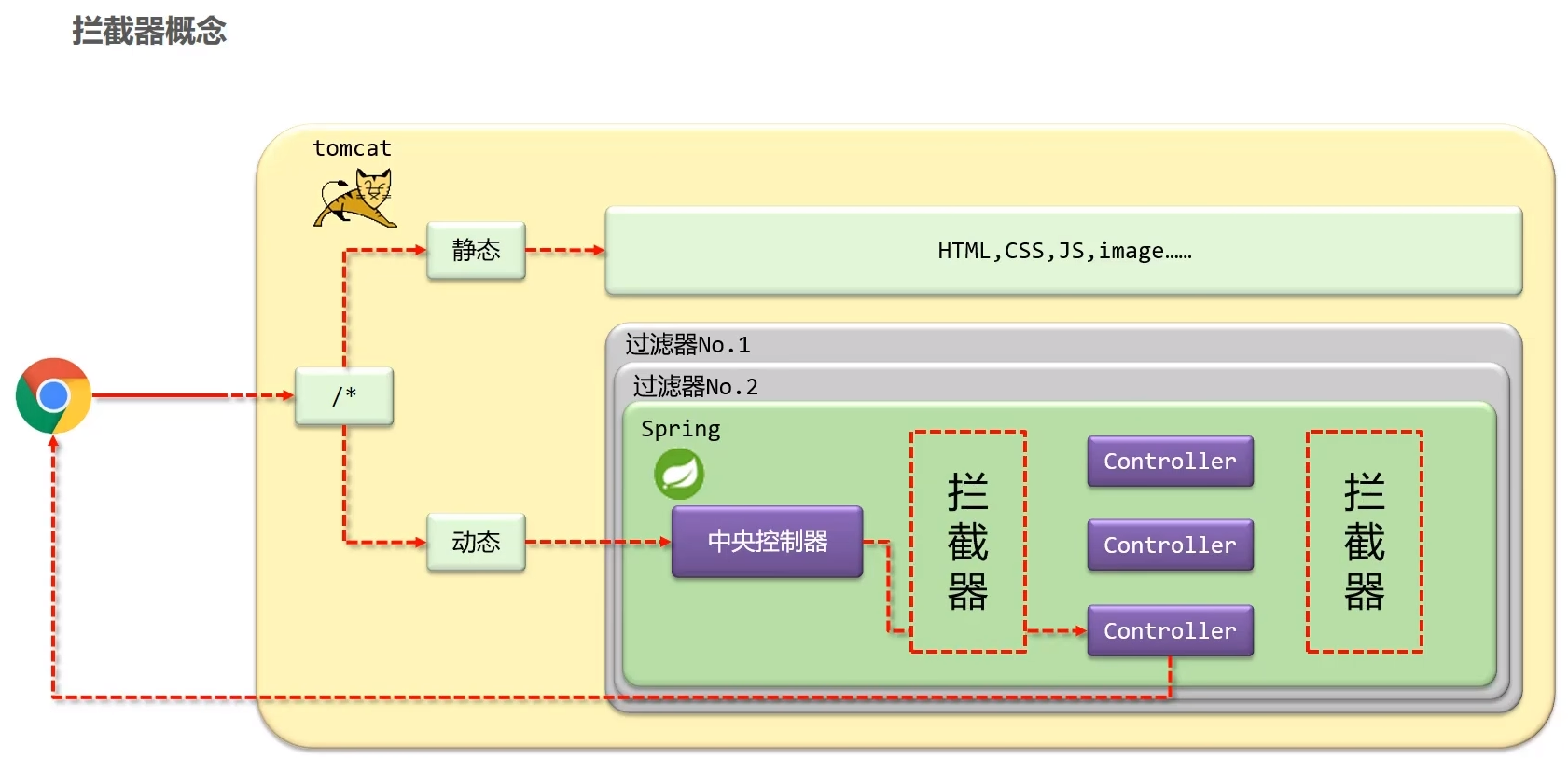
拦截器是一种动态拦截方法调用的机制,在SpringMVC中动态拦截控制器方法的执行
作用
- 在指定的方法调用前后执行预先设定的代码
- 阻止原始方法的执行
拦截器与过滤器的区别
归属不同
- Filter 属于Servlet技术,Interceptor属于SpringMVC技术
拦截内容不同
Filter对所有访问进行增强,Interceptor仅针对SpringMVC的访问进行增强
//设置spring-mvc拦截哪些请求
protected String[] getServletMappings() {
    return new String[]{"/"};
}
# 配置及参数
//拦截器 配置
@Component
public class ProjectInterceptor implements HandlerInterceptor {

    //在目标方法执行之前  执行   可以用来进行数据校验,权限判断 等
    public boolean preHandle(HttpServletRequest request, HttpServletResponse response, Object handler) throws Exception {
        //网络参数
        String contentType = request.getHeader("Content-Type"); //可以获取request和response中的数据

        //对象参数
        HandlerMethod hm=(HandlerMethod) handler;
        hm.getMethod();// 这里可以得到原始执行的对象,至于可以干什么,先学反射


        System.out.println("前1"+contentType);


        return true;
        //return false;// 表示终止访问
    }

    //在目标方法执行之后 视图对象返回之前执行
    public void postHandle(HttpServletRequest request, HttpServletResponse response, Object handler, ModelAndView modelAndView) throws Exception {
        //modelAndView  可以用来修改视图和模型    但是现在异步请求,返回的是json数据,所以用的不多
        //modelAndView.addObject("user1","凉冰");//将user1的参数由diana改成了凉冰

        System.out.println("后1");
    }

    //在所有流程执行完毕后
    public void afterCompletion(HttpServletRequest request, HttpServletResponse response, Object handler, Exception ex) throws Exception {
       //ex
        //这里可以得到 方法运行的异常 ,不过异常都已经进行了统一处理,所以用处也不大。

        System.out.println("最后1");
    }
}
在SpringMVC中声明拦截器,并配置拦截器链
@Configuration
public class SpringMvcSupport extends WebMvcConfigurationSupport{

    @Autowired
    private ProjectInterceptor projectInterceptor;
    @Autowired
    private ProjectInterceptor2 projectInterceptor2;

    @Override //放行静态资源
    protected void addResourceHandlers(ResourceHandlerRegistry registry) {
        //当访问/pages/??? 时候, 走/pages目录下的内容
        registry.addResourceHandler("/pages/**").addResourceLocations("/pages/");
        registry.addResourceHandler("/js/**").addResourceLocations("/js/");
        registry.addResourceHandler("/css/**").addResourceLocations("/css/");
        registry.addResourceHandler("/plugins/**").addResourceLocations("/plugins/");
    }

    @Override//添加拦截器链   在前面的先执行
    protected void addInterceptors(InterceptorRegistry registry) {
        //拦截  /books和/books/*
        //  /books只能拦截 /books  不能拦截/books/1
        registry.addInterceptor(projectInterceptor).addPathPatterns("/books","/books/*");
        registry.addInterceptor(projectInterceptor2).addPathPatterns("/books","/books/*");
    }
}
# 拦截器链
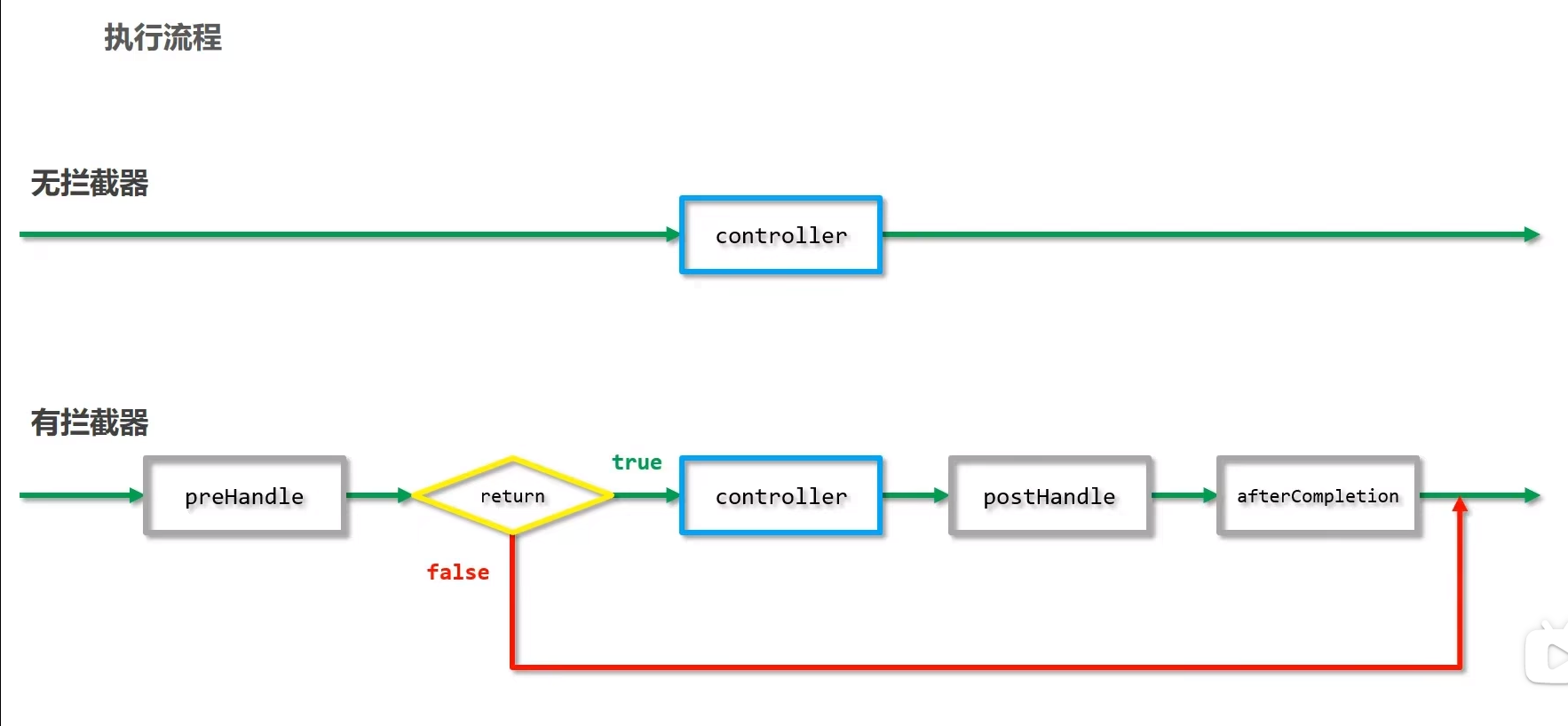
单拦截器执行流程图
拦截器链执行流程图
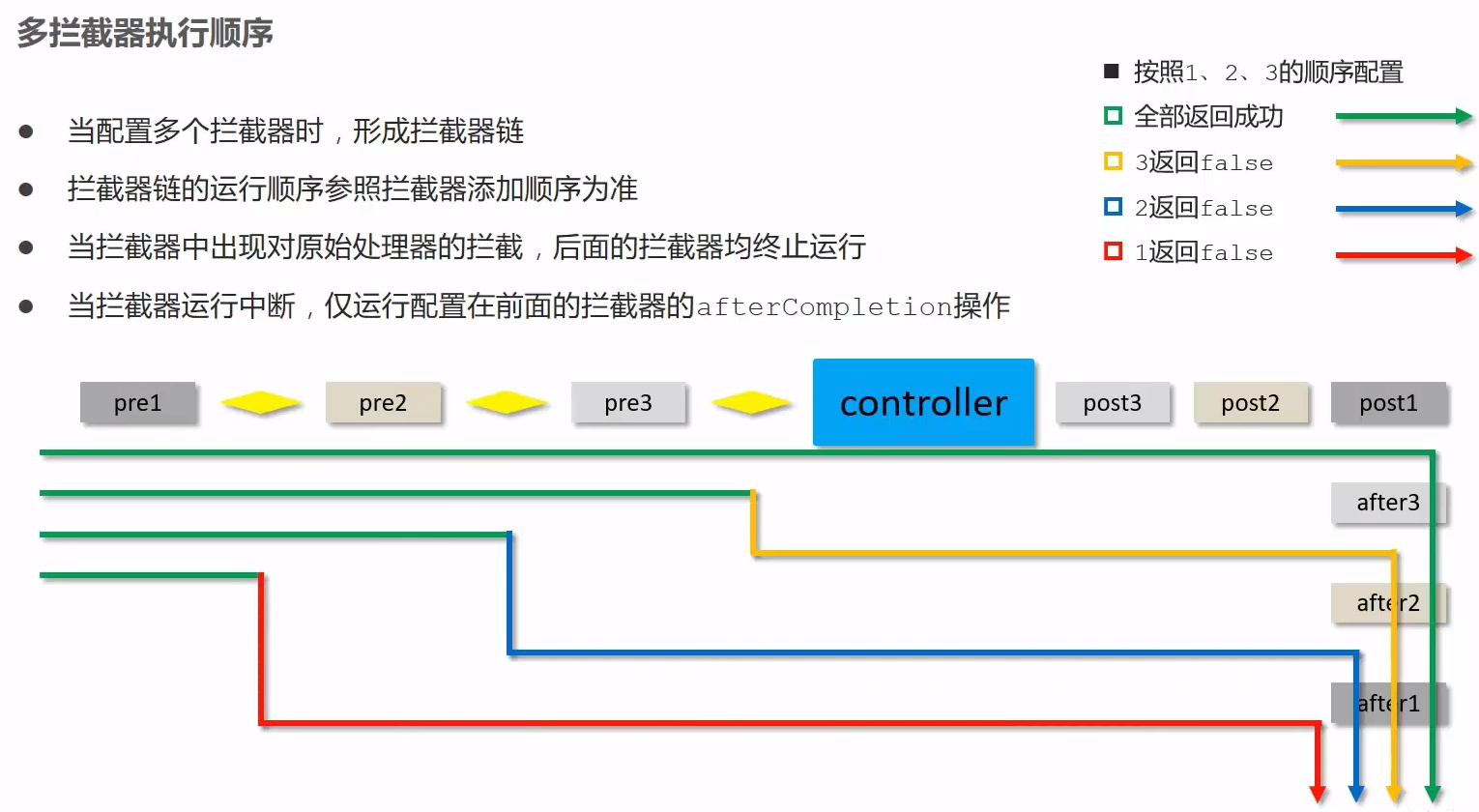
拦截器链执行流程 文字版描述
/**
 * 拦截器链的执行顺序
 *  preHandle1——>preHandle2——>postHandle2——>postHandle1——>afterCompletion2——>afterCompletion1
 *   1.preHandle1 必定运行,若返回false,则直接结束
 *   2.preHandle1 返回为true,则preHandle2必定运行,若preHandle2返回false,则直接跳转到afterCompletion1
 *   3.preHandle1,preHandle2 均返回true,则按顺序进行
 *   4.只要有一个preHandle返回false,postHandle都不会运行,对应的afterCompletion也不会执行
 *
 */
# 案例
# 查询全部
getAll() {
    //发送ajax请求  查询所有
    axios.get("/books").then(resp=>{
        this.dataList=resp.data.data;
    });
},
# 添加
- 按照后台给予的状态码 进行判断,并进行相应的操作
- 注意
.finally(()=>{})的用法,表示最后一定执行这个,把前排重复的操作拿出来放到里面,简化开发。 - 注意
this.$message.success();弹出绿色弹框 - 注意
this.$message.error();弹出绿色弹框
//弹出添加窗口
handleCreate() {
    //显示弹窗
    this.dialogFormVisible=true;
    //重置表单
    this.resetForm();
},

//重置表单
resetForm() {
    this.formData={};
},

//添加
handleAdd () {
    //发送ajax请求  添加数据
    axios.post("/books",this.formData).then(resp=>{
        console.log(resp.data); //控制台打印data

        if(resp.data.code===20011){//如果操作成功
            // 关闭弹窗
            this.dialogFormVisible=false;
            //成功提示
            this.$message.success("添加成功!!");
        }else if(resp.data.code===20010){
            //失败提示
            this.$message.error("添加失败!!");
        }else{
            //异常提示
            this.$message.error(resp.data.msg);
        }
    }).finally(()=>{ //无论哪种情况,最后都走这个
        this.getAll(); //查询所有
    })
},
# 修改
//弹出编辑窗口
handleUpdate(row) {

    //得到编辑数据的id     row.id
    //数据回显   根据id查询
    axios.get("/books/"+row.id).then(resp=>{
        if(resp.data.code===20041){//如果操作成功
            this.dialogFormVisible4Edit=true; //显示编辑弹窗
            this.formData=resp.data.data; //数据回显
        }else{
            //异常提示
            this.$message.error(resp.data.msg);
        }
    });
},

//编辑
handleEdit() {
    //发送ajax请求  修改数据
    axios.put("/books",this.formData).then(resp=>{
        // console.log(resp.data); //控制台打印data

        if(resp.data.code===20031){//如果操作成功
            // 关闭弹窗
            this.dialogFormVisible4Edit=false;
            //成功提示
            this.$message.success("修改成功!!");
        }else if(resp.data.code===20030){
            //失败提示
            this.$message.error("修改失败!!");
        }else{
            //异常提示
            this.$message.error(resp.data.msg);
        }
    }).finally(()=>{ //无论哪种情况,最后都走这个
        this.getAll(); //查询所有
    })
},
# 删除
this.$confirm().then().catch()弹出提示框,确定走then,取消走catch- 注意这个
finally(()=>{})的位置,跟在内层then后面,呆在外层then里面
/ 删除
handleDelete(row) {
    //1.弹出提示框
    this.$confirm("此操作将永久删除当前数据,是否继续?","提示",{
        type:'info'
    }).then(()=>{
        //点击确定  删除业务
        //得到编辑数据的id     row.id
        axios.delete("/books/"+row.id).then(resp=>{
            if(resp.data.code===20021){//如果操作成功
                this.$message.success("删除成功!");//信息提示
            }else{
                //异常提示
                this.$message.error("删除失败!");
            }
        }).finally(()=>{//无论哪种情况,最后都走这个
            this.getAll();
        });
    }).catch(()=>{
        //点击取消 异常提示
        this.$message.info("取消删除操作!");
    });
}
上次更新: 2023 07 3